GUIDE
Company Accounts
Order together as a team: shared billing, role-based access, company orders and invoices in one place.
Go to Company SettingsWhat is a company account?
With a company account, your team shares one set of billing details on Solidshell Enclosures, sees the company orders and invoices, and works under the roles you assign.
- One shared billing identity (tax/VAT number) for every order the team places.
- Role-based access, so each member only sees and does what you allow.
- Company-wide visibility of orders, invoices, and any products we make just for you.
Creating a company
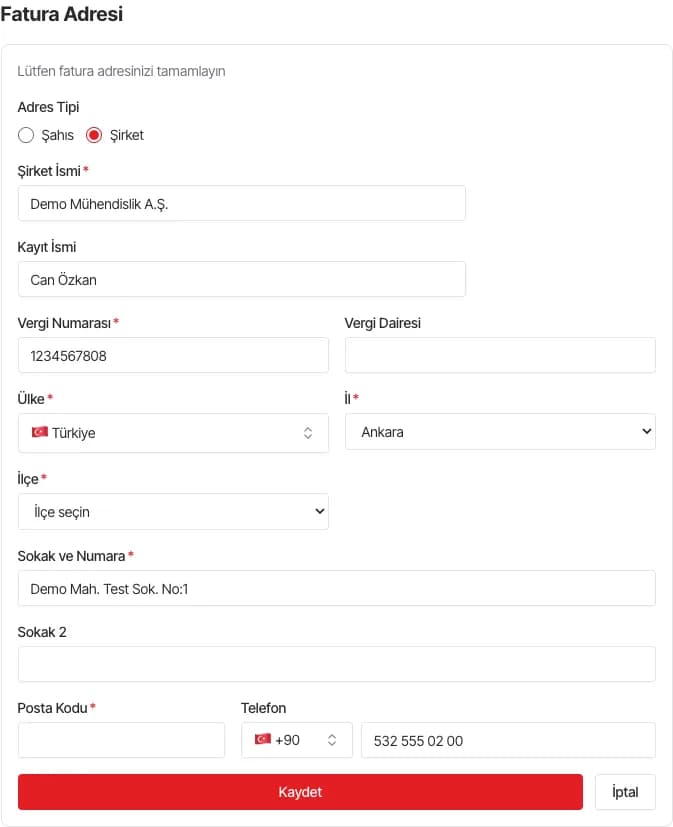
You can turn your account into a company from the billing address form, either at checkout or in your account addresses.
- 1Open the billing address form and switch the account type from "Person" to "Company".
- 2Enter your company name and your tax/VAT number, then save.
- 3Confirm in the dialog to create the company and link it to your account.
We validate your tax/VAT number before creating the company. Whoever creates the company becomes its Manager.
Joining an existing company
If your company already exists on Solidshell Enclosures, you join it by matching its tax/VAT number rather than creating a new one.
- 1Go to your profile or billing address and enter the company's tax/VAT number.
- 2Save. Your account joins the company, and its managers get a notification.
You join as a Member by default. If the company has no manager yet, you become its first Manager instead. A manager can change your role later. You can belong to only one company at a time, and we limit tax-number changes for security.
Roles & permissions
Every member has a role that sets what they can do. There are four roles, and a manager can change anyone's role at any time.
| Role | Buy | Orders | Invoices | Addresses | Products | Admin |
|---|---|---|---|---|---|---|
| Member | ||||||
| Manager | ||||||
| Buyer | ||||||
| Accountant |
"Buy" = can place orders; "Orders/Invoices" = can see the whole company's orders and invoices; "Addresses" = can manage company addresses; "Products" = can view company special products; "Admin" = full management, including roles and members. Managers have every permission.
Managing your team
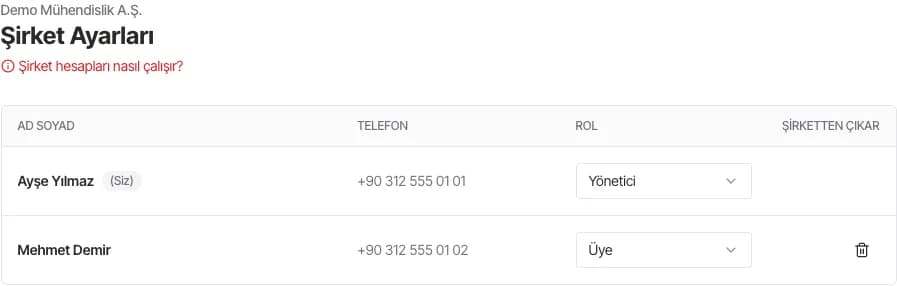
Manage your team from the Company Settings page in your account.
- 1Open Account > Company Settings to see everyone in your company.
- 2Pick a role for each member from the role menu; the info icon lists what each role can do.
- 3Remove a member from the company when they should no longer have access.
Every company keeps at least one Manager, so you can't demote or remove the last one.
Checking out as a company
When a company member checks out, the order bills to the company, not the person.
- The order uses the company billing details.
- The tax/VAT number comes from the company; you can't change it at checkout.
- You can ship to the company address or to one of your own saved addresses.
- After the company's first invoice, the tax number locks. Contact us to change it.
My Products (special products)
If we make items just for you, they show up under My Products in your account.
- Open Account > My Products to browse what we make for you or your company.
- Open a special product here and the page preselects your exact variant. These products stay private and never appear in the public catalogue.
Frequently asked questions
Can I move my existing account into a company?
Yes. Switch the billing address type to "Company" and enter your tax/VAT number, or enter an existing company's number to join it.
What happens to my personal orders when I join a company?
Your past orders stay yours. After you join, new orders go under the company, and visibility follows your role.
Who can add or remove members?
Only Managers (admins) can assign roles, change permissions and remove members, from the Company Settings page.
Why can't I change the tax number anymore?
For accounting integrity, the tax/VAT number locks after the company's first invoice. Contact us if it needs to change.
Need a hand?
Our sales team can help you set up your company account, assign roles or move existing users.
Contact sales